
Cluster Information
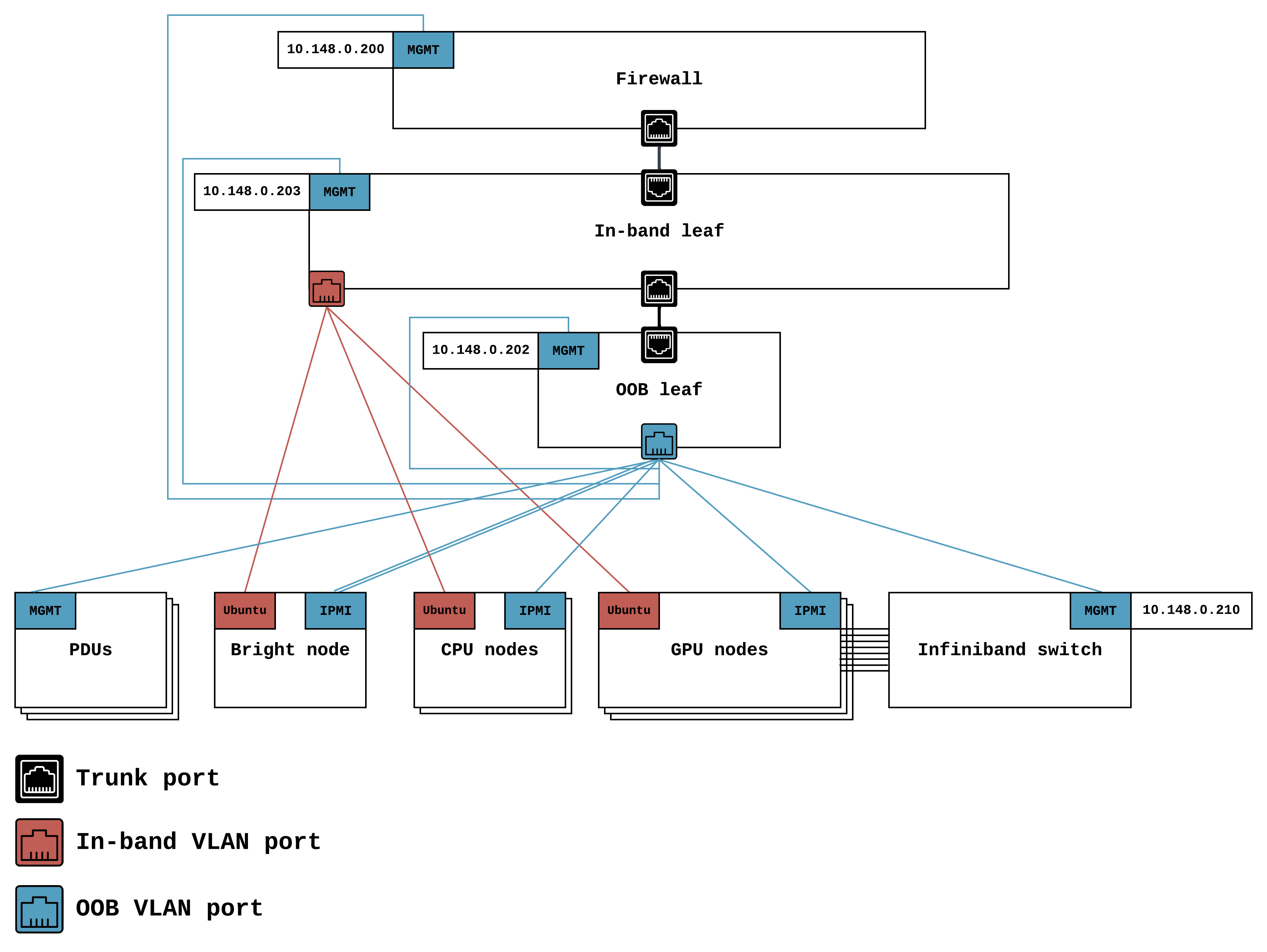
Your cluster’s firewall appliance. It provide network protection and remote access services. All traffic into and out of your cluster is mediated by the FortiGate firewall appliance.
Endpoint: https://127.0.0.1:10443/
Username: rakuten
Password: provided by Lambda during hand-off
This portal provides a simple way of directly accessing your cluster from your browser.
Endpoint: https://10.148.0.200
Username: admin
Password: provided by Lambda during hand-off
This portal enables you to do various administrative tasks, including user management. Note that the admin web portal has two endpoints for high availability. If you want to do administrative tasks, first try using gi-primary; if it’s down, try gi-secondary.
| CIDR | Use cases | |
|---|---|---|
| In-band | 10.141.0.0/24 | Accessing Ubuntu OS on GPU nodes and head nodes |
| Out-of-band | 10.148.0.0/24 |
|
| Hostname | Role | IP address |
|---|---|---|
| lambda-1g-leaf-01 | Out-of-band switch | 10.148.0.202 |
| lambda-10g-leaf-01 | In-band switch | 10.148.0.203 |
| slc-xen-ndrsw-01 | InfiniBand switch | 10.148.0.210 |
Username: admn
Password: provided by Lambda during hand-off
| PDU number | Admin endpoint | MAC address |
|---|---|---|
| 1 | https://10.148.0.191 | 00:0A:9C:66:8F:40 |
| 2 | https://10.148.0.192 | 00:0A:9C:66:85:F2 |
- Software: Ubuntu 22.04
- Chassis: Supermicro A+ Server 1114CS-TNR
- CPU: AMD EPYC 7513 (32 cores, 2.6 GHz)
- Memory: 256 GB (8 x 32 GB 3200 MHz ECC RAM)
- OS storage: 1.92 TB SATA SSD
- Extra storage: 1.92 TB NVMe SSD
- NIC: ConnectX-6 VPI, dual-port, 200 gbps
| Hostname | In-band MACs | In-band IP address | IPMI MACs | IPMI endpoint |
|---|---|---|---|---|
| slc-xen-headnode-1 |
|
10.141.0.254 | 3C:EC:EF:D8:7F:B4 | https://10.148.0.254 |
| slc-xen-login-01 |
|
10.141.0.251 | 3C:EC:EF:E0:E0:FC | https://10.148.0.251 |
| slc-xen-login-02 |
|
10.141.0.252 | 3C:EC:EF:E0:ED:30 | https://10.148.0.252 |
- Software: Ubuntu 22.04, OFED, Lambda Stack (PyTorch, TensorFlow, NVIDIA drivers, CUDA, cuDNN)
- Chassis: AS-8125GS-TNHR
- CPU: AMD EPYC 9654 (96 cores, 2.4 GHz)
- GPUs: 8x NVIDIA H100 GPUs, SXM5, NVLink and NVSwitch connected
- Memory: 1.5 TB (24 x 64 GB 3200 MHz DDR4 ECC RAM)
- Storage: 1x 3.84 TB NVMe, 2x 7.68 TB NVMes
- NICs: 8x ConnectX-7, single-port, 400 gbps
| Hostname | In-band MACs | In-band IP address | IPMI MACs | IPMI endpoint |
|---|---|---|---|---|
| slc-xen-h100-001 |
|
10.141.0.101 | 7C:C2:55:5F:06:13 | https://10.148.0.101 |
| slc-xen-h100-002 |
|
10.141.0.102 | 7C:C2:55:5F:0C:B5 | https://10.148.0.102 |
| slc-xen-h100-003 |
|
10.141.0.103 | 7C:C2:55:5E:F5:79 | https://10.148.0.103 |
| slc-xen-h100-004 |
|
10.141.0.104 | 7C:C2:55:5E:F5:7C | https://10.148.0.104 |
| slc-xen-h100-005 |
|
10.141.0.105 | 7C:C2:55:5E:F5:76 | https://10.148.0.105 |